RDP & SSH · iPhone Duo · iPad · iPhone

Your travel workstation, unfolded.

Put an unfolded iPhone Duo on a stand with a pocket keyboard and trackpad—or set it half-open like a mini laptop with the built-in Session Keyboard and multi-touch Trackpad below the fold. Switch between Windows desktops and SSH shells without dropping a single session.

Private beta · iOS and iPadOS 17+ Touch ID & Face ID App Lock Direct LAN / VPN · No cloud relay
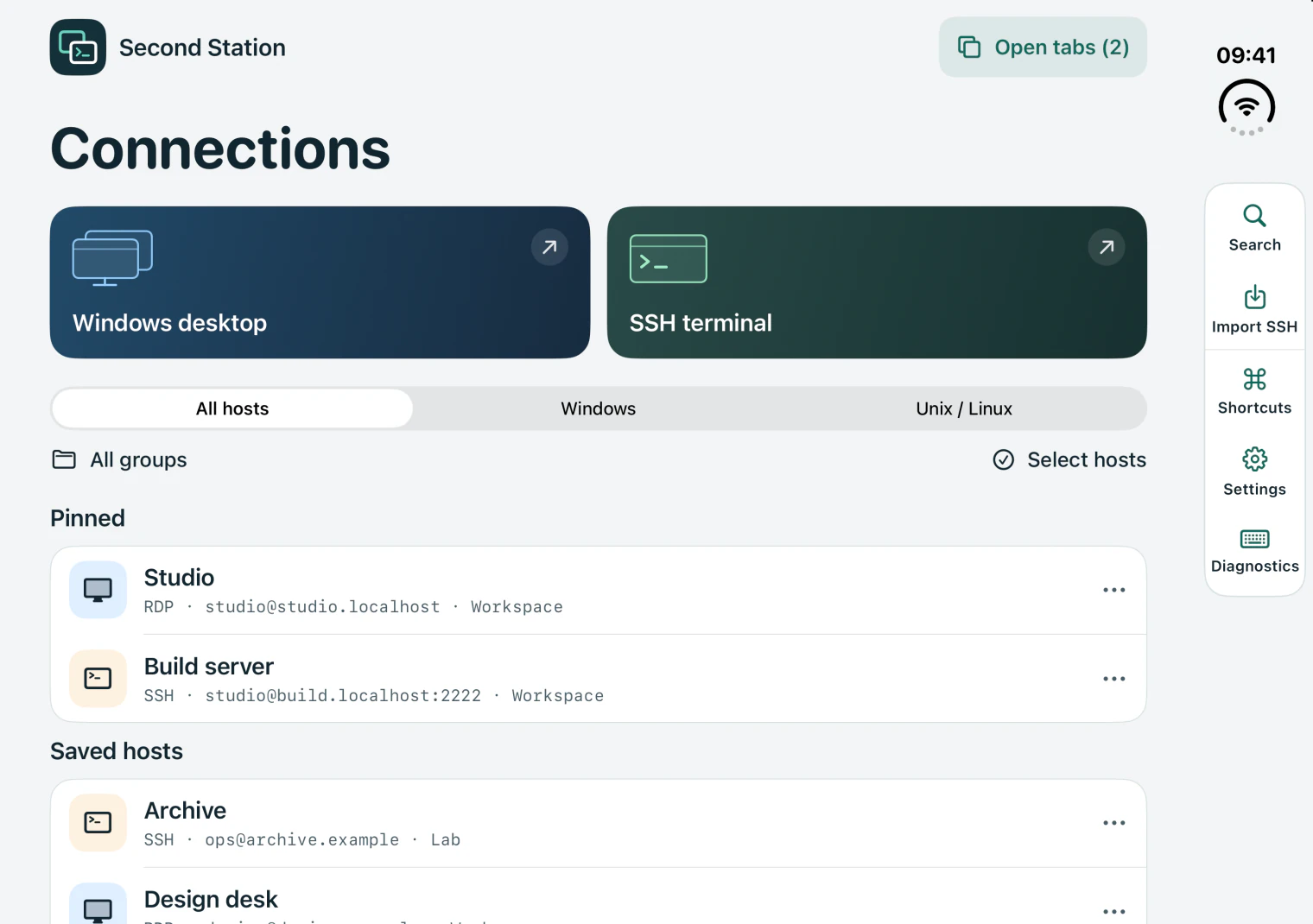
Second Station host library on the unfolded Duo, with pinned RDP and SSH connections and a side toolbar.
Hardware-first ergonomics

Built for flat stands, half-open laptop mode, and pocket keyboards.

Whether your iPhone Duo is propped open on a desk with a Bluetooth keyboard or resting half-folded on a train tray table, Second Station adapts every pixel around the hinge and status corners.

01 · EVERY PIXEL USED

Side rail in landscape, status row in portrait

Built with the iOS 27.1 SDK, Second Station reads display occlusion and division geometry. In landscape on unfolded Duo, tabs stack vertically below the clock and signal bar; in portrait, they tuck neatly beside the clock—leaving full screen height for Windows and SSH.

02 · HALF-OPEN CLAMSHELL

Session Keyboard & Trackpad below the fold

Set your Duo half-open with a horizontal hinge to keep Windows or your terminal above the crease and touch controls below. Includes sticky Ctrl, Alt, Shift, Win, Fn (F1–F12, Home/End/PgUp/PgDn), a Polish Ąę diacritics key, and a toggleable multi-touch Trackpad.

03 · POCKET HARDWARE

Cube Pocket HID & Win+J / ⌘J tab bounce

Tested on Duo with the Nillkin Cube Pocket. Hardware keys send true press/release scancodes, and pressing Win+J (Cube) or ⌘J (Apple) flips instantly between your two most recent session tabs.

04 · SEAMLESS CONTINUITY

Live fold, unfold, and rotation

Your session stays open as you fold or rotate Duo. Windows desktops update resolution via RDP Display Control, SSH terminals recalculate PTY columns and rows on the fly, and closing the hinge automatically stows the touch input panel.
Two native engines · One workspace

Desktop graphics, terminal precision, and biometric protection.

Jump to any saved host from the library with ⌘F, or bounce between an active Windows desktop and Linux shell with Win+J / ⌘J.

Windows Desktop · RDP

Hardware H.264 RDPGFX, Touch Trackpad & Native Cursors

FreeRDP negotiates a graphics codec with Windows. When the server selects H.264, the app uses Apple VideoToolbox to decode it. You can also select Classic graphics in the host settings. Switching between Keyboard and Trackpad keeps the desktop resolution.

  • Windows-driven cursor shapes: see the real I-beam in Notepad or resize arrows on window borders, scaled accurately with click hotspots.
  • Multi-touch Trackpad: 1-finger move, tap to click, double-tap to open, hold-and-slide to drag, and 2-finger tap/slide for right-click and scrolling.
  • Fit to window & Windows Scale: negotiates exact viewport resolution at login and after posture changes, with per-host DPI scaling.
  • 45-second frame telemetry & SHA-256 pinning: inspect live codec/loop timings and verify self-signed TLS certificates in Keychain.
Unix / Linux · SSH

Interactive PTY & OpenSSH Config Import

Built on libssh2 1.11.1 and SwiftTerm 1.99.3 for responsive tmux sessions, Option-as-Meta navigation, and resilient roaming recovery.

  • Dual keyboard choice: use the built-in Session Keyboard (with Fn & repeat arrows) or the iOS system keyboard with terminal shortcuts tucked under the Duo fold.
  • Smart ~/.ssh/config import: parses aliases, ports, users, and automatically links saved Keychain keys matching IdentityFile filenames (e.g. pbs_ed25519)—preserving host groups on re-import.
  • Disconnected scrollback remains selectable and copyable, with previous-session text kept in tab memory after reconnecting, and Esc closes ended tabs cleanly.
Cross-Session Workflow

Shared clipboard & instant tab switching

Highlight output in SSH, press Win+J or ⌘J to flip to your Windows tab, and paste with Ctrl+V—or copy in Windows and paste into SSH with ⌘V. Line breaks, indentation, and Unicode stay intact.

SSH Copy → Win+J / ⌘J → Ctrl+V in Windows
Touch ID · Face ID · Keychain

Biometric App Lock & zero-relay privacy

Enable Require Touch ID or Require Face ID in Settings to lock Second Station on launch and whenever you leave the app, with automatic multitasking snapshot masking.

  • App Switcher privacy cover hides open desktops, terminals, and sheets as soon as the app leaves the foreground.
  • The iOS Keychain protects saved passwords, SSH keys, and trusted fingerprints. You can include them in a password-encrypted full backup in Files or iCloud Drive.
FreeRDP 3.33.1 (Apache 2.0) OpenSSL 3.5.9 (Apache 2.0) libssh2 1.11.1 (BSD-3-Clause) SwiftTerm 1.99.3 (MIT) LocalAuthentication Touch ID / Face ID
⌘ Built-in Cheat Sheet

Keyboard-driven from library search to live shell.

Open the ⌘ Shortcuts guide anytime from the Duo side rail or session menu (and dismiss it with Esc). Toggle your keyboard layout below:

Host library & search Connections

Find a host by name or address Filters within the selected folder group and protocol
Win+F
Highlight previous or next result Navigate matches without touching the screen
↑ / ↓
Open host or jump to its open tab In bulk-select mode, toggles selection on the highlighted host
Enter
Close search or dismiss ⌘ guide
Esc

Session tabs & SSH terminal Tabs · SSH

Return to the previous tab With 2+ tabs open, press again to bounce right back
Win+J
Paste into SSH terminal Works seamlessly with text copied from Windows RDP
Win+V
Toggle Alt / Option as Meta Switch Meta behavior live inside an active SSH session
Win+Alt+O
Interrupt command / Close ended tab Esc closes the tab once the SSH session ends
Ctrl+C · Esc

Windows desktop RDP

Copy & paste across Windows and iOS/SSH
Ctrl+C · Ctrl+V
Open Windows security options Also available via ••• → Send keys
Ctrl+Alt+Del

Host groups & bulk actions Library

Mixed RDP & SSH folder groups Keep Windows desktops and Linux hosts together by project or site
Folder filter
Select hosts & Select visible Batch-move filtered results to a new or existing group in seconds
Multi-select

App Store launch pricing

Second Station is in private testing. Free includes one saved host per protocol. Pro unlocks the full host library with a single purchase.

Free plan
Free unlimited session length

Every protocol, security, and Duo posture feature included from minute one.

  • 1 saved RDP host + 1 saved SSH host in your library
  • Unlimited quick connections to any address
  • Full Duo layouts, half-open Session Keyboard (Ąę, Fn) & RDP Trackpad
  • Touch ID / Face ID App Lock & App Switcher privacy cover
  • H.264 RDPGFX, SSH private keys, Win+J / ⌘J tab switching